expandable and collapsible sections in KBs
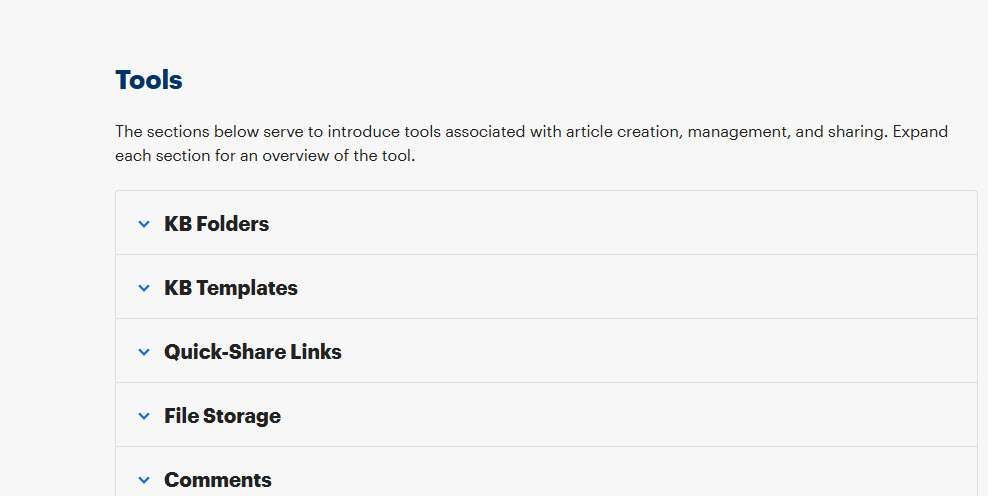
This feature would allow us to select a paragraph or two and make it to where it is collapsed by default. But one could also expand it if that information applies to them.
You can see the use of sections on Hudu's support website (tools section). https://support.hudu.com/hc/en-us/articles/8056277827351-Knowledge-Base
Workaround: I create a new KB and then link to it so the one KB doesn't get so cluttered.
Log in to comment and vote
Comments4
Jan 25, 2024
Now available in v2.28: https://hudu.com/blog/release-update-hudu-2.28
Dec 14, 2023
Azure Waterfall
Dec 12, 2023
Very much need this - it's a blocker in our migration from Confluence.
Only option currently is either like you say, linking to other docs (which is not ideal), or editing the HTML to add a
Azure Waterfall
Dec 13, 2023
Currently we do this with code like the following, but if we could have a button to click in the editor that just creates this HTML so techs could use it (and maybe makes it look clear in the editor what is and isn't inside this details box, that would be perfect:
And then custom CSS like so:
details {
border: 1px solid transparent;
border-radius: 4px;
padding: 0.5em 0.5em 0;
pointer-events: none;
}
details:hover {
border: 1px solid #aaa;
}
details[open] {
padding: 0.5em;
border: 1px solid #ccc;
}
details[open]:hover {
border: 1px solid #aaa;
}
details>summary {
font-weight: bold;
margin: -0.5em -0.5em 0;
padding: 0.5em;
user-select: none;
pointer-events: auto;
}
details>summary:first-of-type {
list-style-type: revert;}